
Welcome Inspire Pilots!
Join our free DJI Inspire community today!
Sign up

Motors will not start

Joined
Jul 25, 2025
Messages
3
Reaction score
0
Age
73
I have a inspire 1

I bought a used inspire 1 drone that needed repaired. The arms were broken.

I replaced the arms.
When I got it back together i charged the radio and drone batteries.

When I started it up the drone did connect to the radio. I tried to start the motor's and they didn’t start. This is without the propellers.
Please help me.

Thank you,
Mike M
 
I have a inspire 1

I bought a used inspire 1 drone that needed repaired. The arms were broken.

I replaced the arms.
When I got it back together i charged the radio and drone batteries.

When I started it up the drone did connect to the radio. I tried to start the motor's and they didn’t start. This is without the propellers.
Please help me.

Thank you,
Mike M
More information needed. Share the error messages that pop up on the screen.

D
 
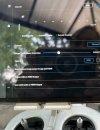
A picture are with this post .

The line with all the numbers look at the dots.

Also I get this at top of my page where it says ok to fly.
No positioning ( atti ).

Also I get a green light on the tail of the drone.

Hope this helps.
Thank you,
Mike M
 

Attachments

  • IMG_0305.jpeg
    IMG_0305.jpeg
    1.2 MB · Views: 7
A picture are with this post .

The line with all the numbers look at the dots.

Also I get this at top of my page where it says ok to fly.
No positioning ( atti ).

Also I get a green light on the tail of the drone.

Hope this helps.
Thank you,
Mike M
Have you tried manual motor arm? Moving both sticks together?
 
A picture are with this post .
The original post as no photos.


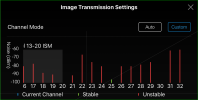
The line with all the numbers look at the dots.
Those should be lines. I don't know why you're only getting dots.
1754278729562.png


Also I get this at top of my page where it says ok to fly.
No positioning ( atti ).
This means you have not acquired enough satellites for GPS lock. Your single photo looks like it was taken from inside a structure (you should screenshot your iPad instead of taking photos of it). It's hard to tell. Looks like you could be outside, but I can't tell. Your Inspire 1 will never acquire satellites from inside. You have to take it outside.


Also I get a green light on the tail of the drone.
This directly conflicts with what you said in your previous sentence. Once you have acquired satellites, and ergo, GPS lock, the back LED blinks green. With no GPS lock it blinks yellow. You should take video.


Hope this helps.
Not much. You need to either take video or take more photos and/or screenshot a few of your iPad screens (never take photos of a screen on a device that has the ability to provide screenshots).

D
 
The original post as no photos.


Those should be lines. I don't know why you're only getting dots.
View attachment 35185


This means you have not acquired enough satellites for GPS lock. Your single photo looks like it was taken from inside a structure (you should screenshot your iPad instead of taking photos of it). It's hard to tell. Looks like you could be outside, but I can't tell. Your Inspire 1 will never acquire satellites from inside. You have to take it outside.


This directly conflicts with what you said in your previous sentence. Once you have acquired satellites, and ergo, GPS lock, the back LED blinks green. With no GPS lock it blinks yellow. You should take video.


Not much. You need to either take video or take more photos and/or screenshot a few of your iPad screens (never take photos of a screen on a device that has the ability to provide screenshots).

D
Sorry not getting back to you sooner. I had a gps and position sensor. I installed the position sensor and it did help with the error message I was getting.
I waiting for the gps module come next. It says on the screen it has a bad GPS.

Also it needs updated. I can not find any of the updates for the radio or drone.
Where do I find them and directions?
Thank you,
Mike M
 
Sorry not getting back to you sooner. I had a gps and position sensor. I installed the position sensor and it did help with the error message I was getting.
I waiting for the gps module come next. It says on the screen it has a bad GPS.
Good deal.


Also it needs updated. I can not find any of the updates for the radio or drone.
Where do I find them and directions?
Firmware version 1.08.xx.xx is the sweet spot. If that's the version you have, DO NOT update.

Software-wise, Go App v3.1.1 is the best version. Don't update that, either.

D
 

Members online

No members online now.

Forum statistics

Threads
22,522
Messages
210,787
Members
39,086
Latest member
snaaifer